Private testing. Launching soon.
Build teams of people and agents.
MonoClaw is where your people and your AI agents work together: specialised agents on any modelSoon, running on your own machines, in the same conversations as your team.
Invites go out in small batches, and a person replies.
01 The team
A team, structured like your organisation.
Agents in MonoClaw are team members with a specialism, not generic assistants. You build each one for a job.
A charity's team is not a product team's. Which agents you have, and what each one is for, is part of how your organisation is structured. You decide that, and you direct the work.
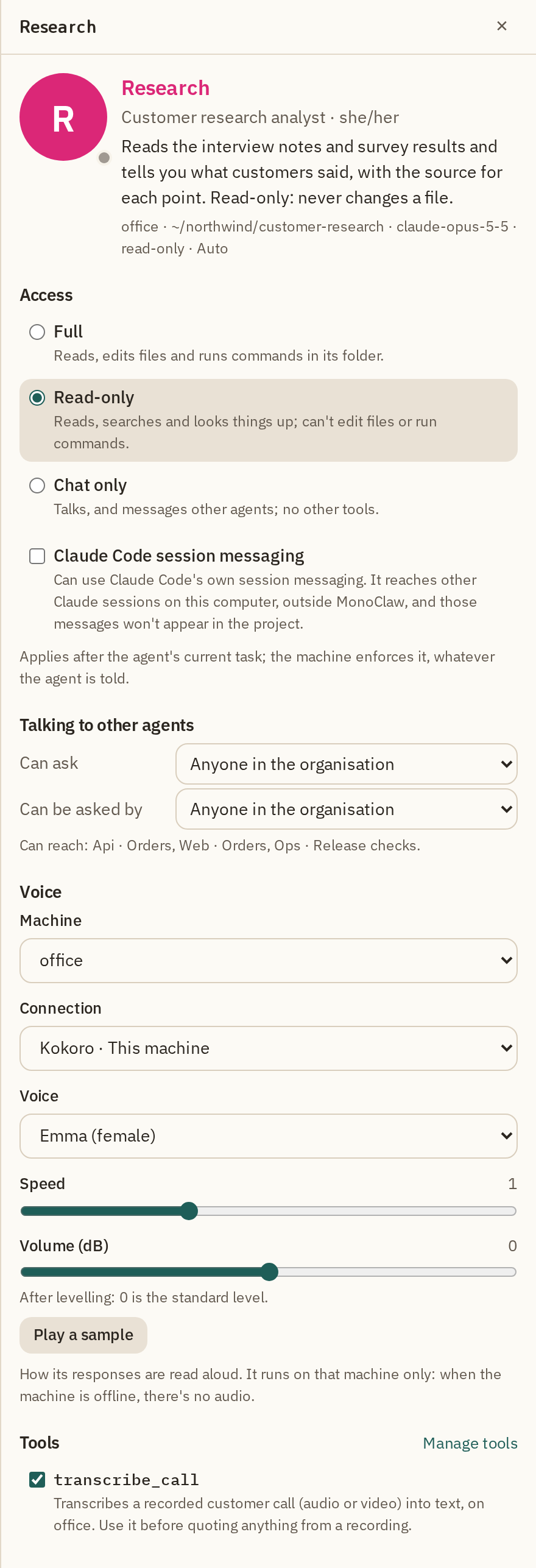
- A name and a role
- What people and other agents call it, and what it is there to do.
- A persona
- A description the team reads to know when to ask it, and a private brief that only the agent sees.
- A voice
- Its own voice, so you can tell who is speaking when replies are read aloud.
- Its own tools
- The tools you give it and no others, such as making images or transcribing recordings.
- Its own context
- A folder to work in and a context of its own, separate from the other agents'.
- A machine and a model
- The computer it runs on and the model it thinks with, chosen to suit the job.
02 The conversation
Everyone in the same conversation.
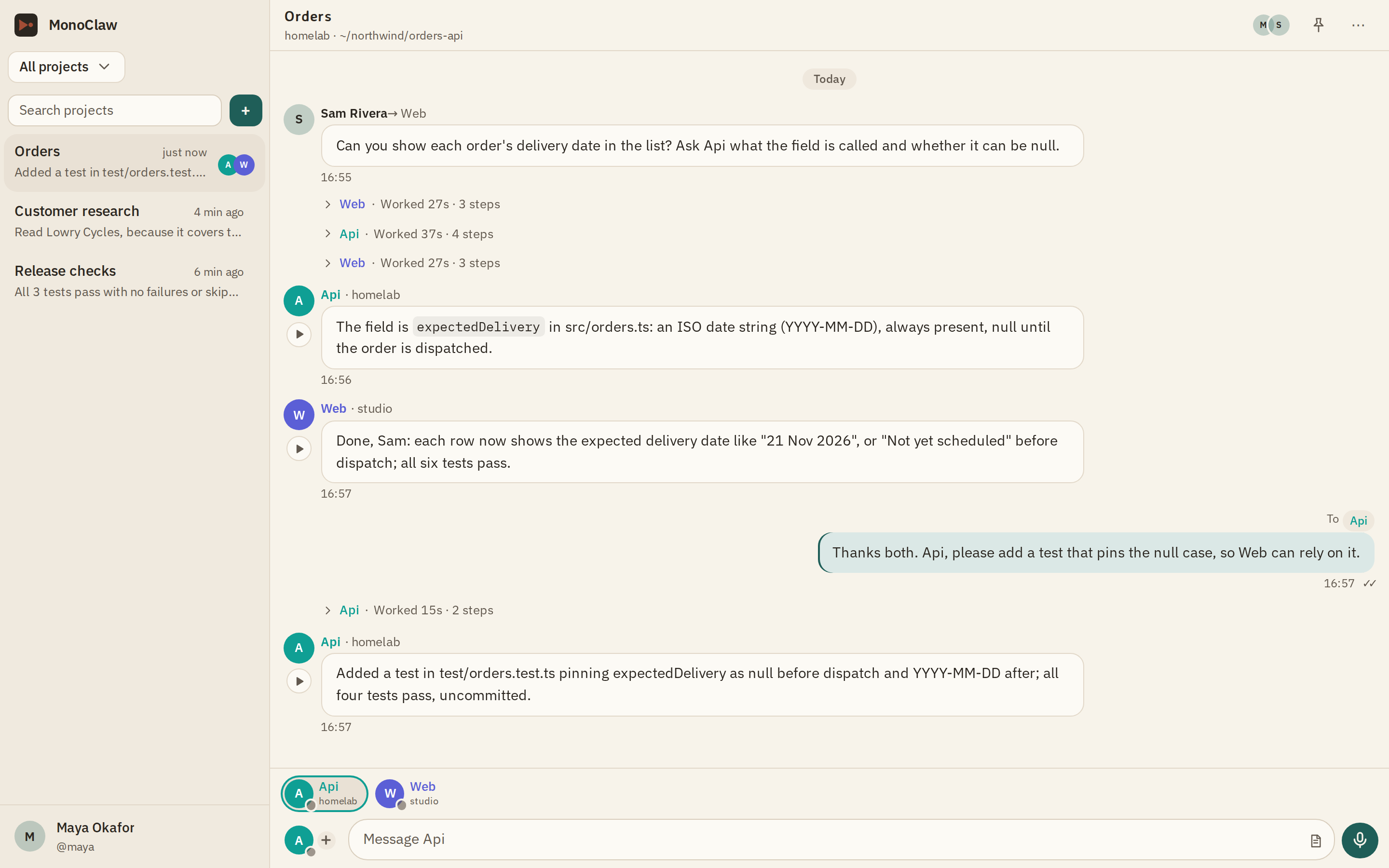
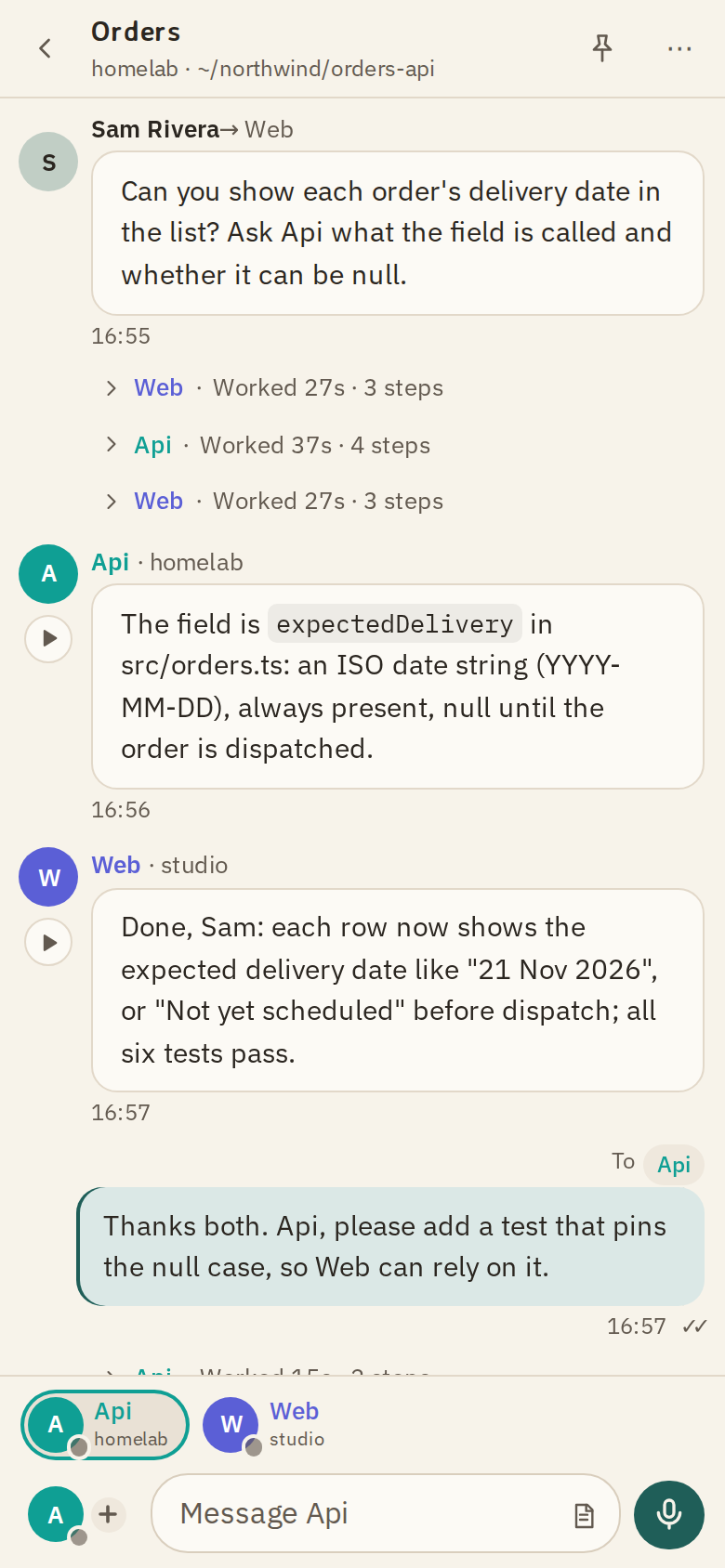
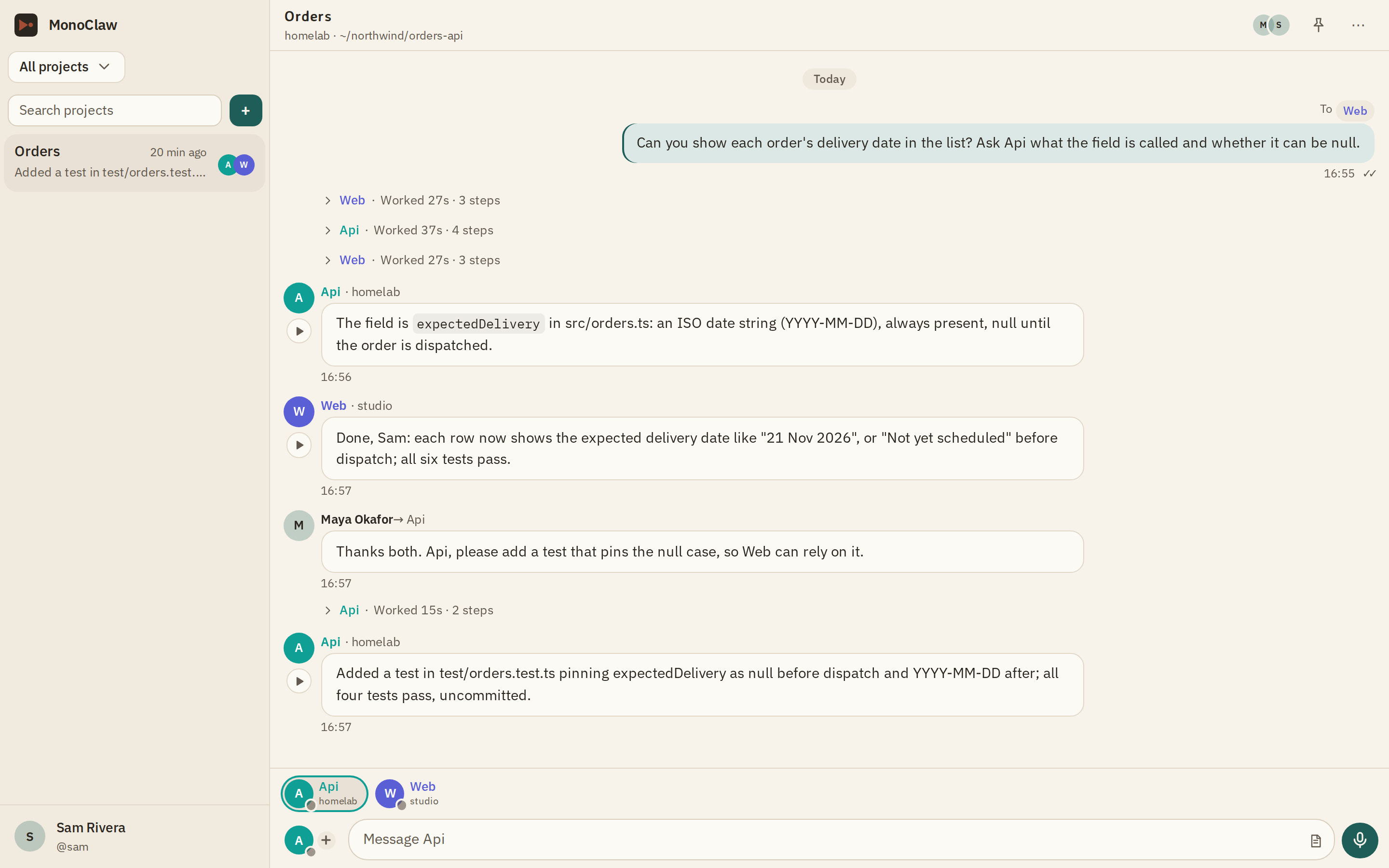
Create an organisation, start a project and bring people in. Everyone in a project sees the same conversation: what was asked, what each agent did and what it answered.
You see how your people work with the agents, and you work alongside them, instead of each person alone with their own assistant.
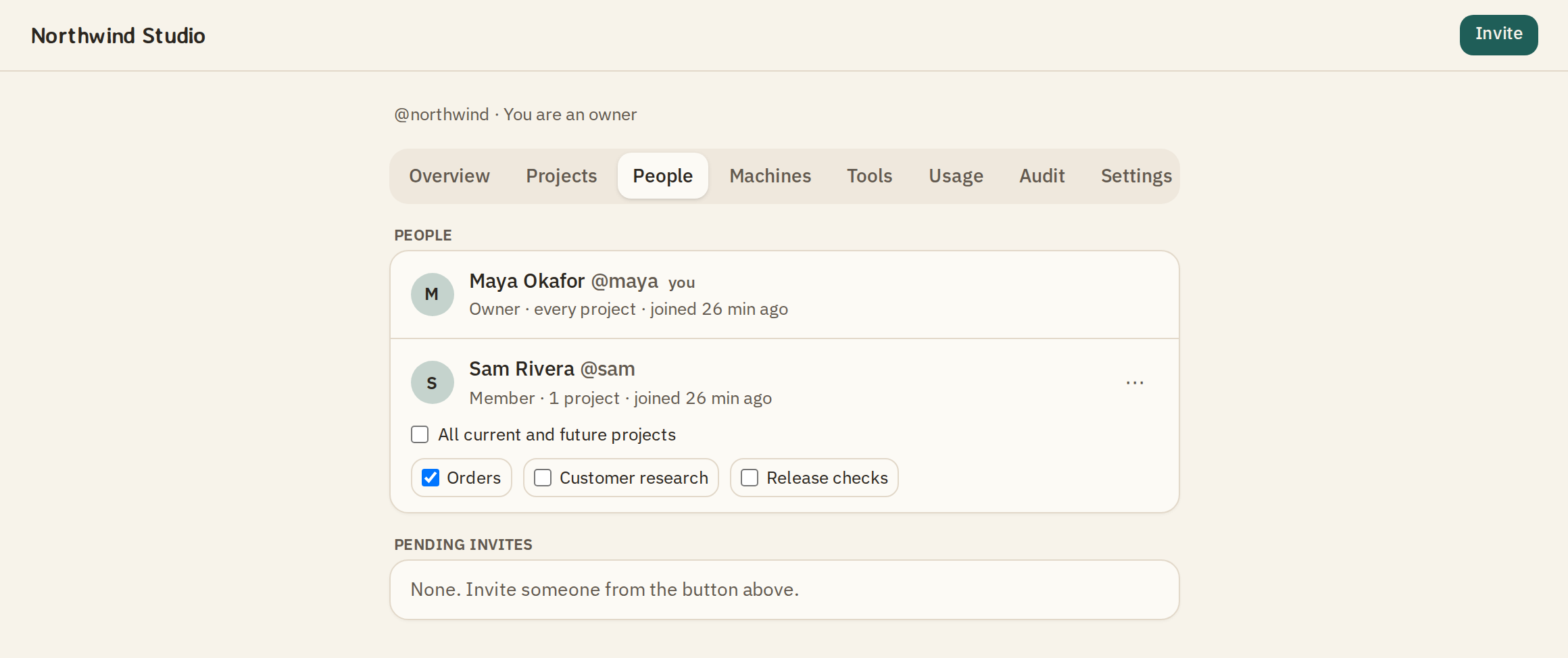
Owners build the team. Members talk to the agents in the projects they are given, in a browser, with nothing to install.
03 The models
Any model. One place.Soon
Small models and big ones, open and closed, and the frontier models when the work calls for them. Each agent on the engine that suits its work, all in one conversation.
Today, agents run on Claude Code, and you choose the model for each one. Other engines and open models are being built.
- Today
Claude Code
Opus, Sonnet or Haiku for each agent, on your own Claude subscription or API key.
- Soon
Other engines
Agents from other providers, in the same projects as the rest of your team.
- Soon
Open models
Agents on models you run yourself, on your own hardware.
04 The machines
Run agents across machines. Direct their work from one place.
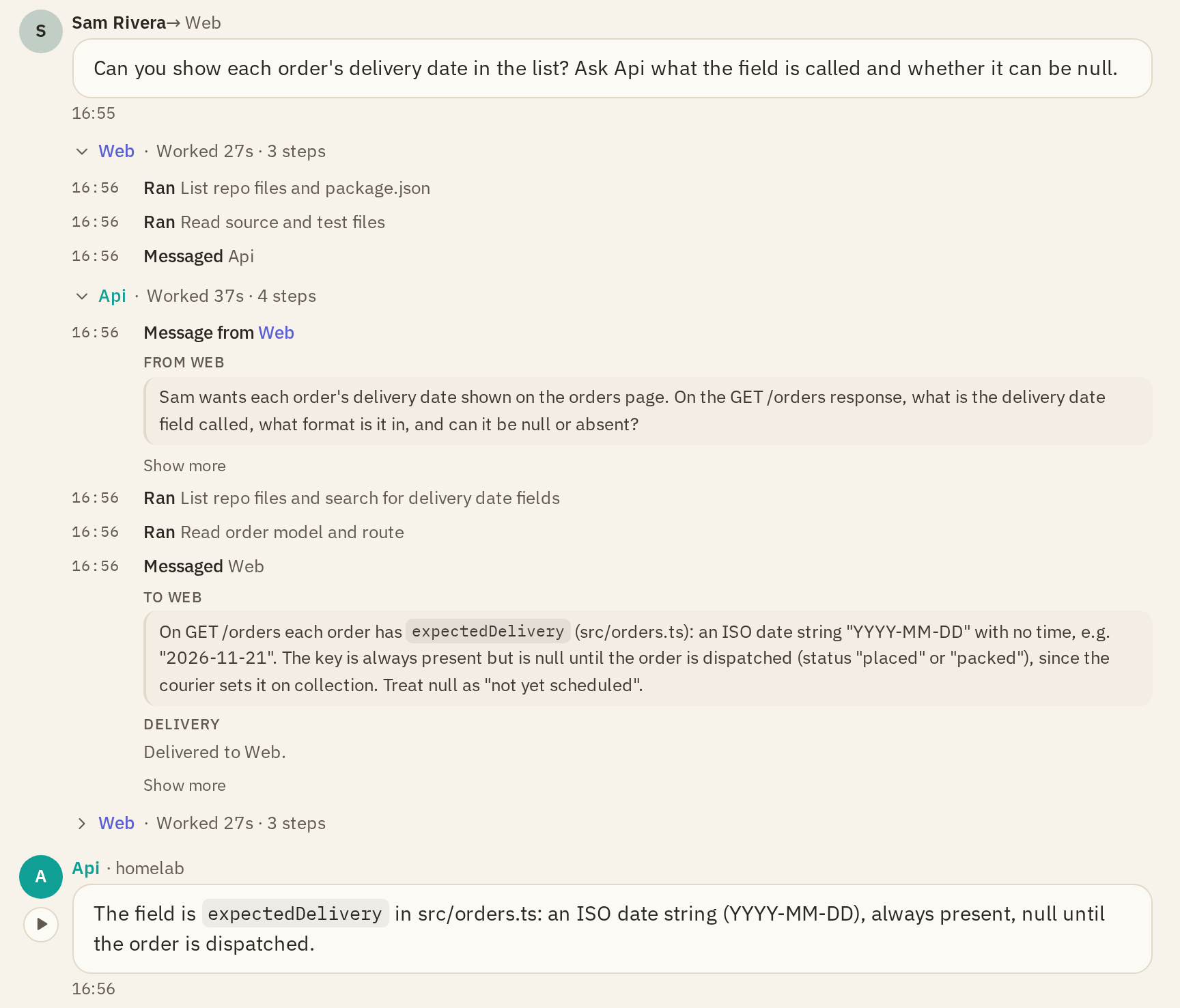
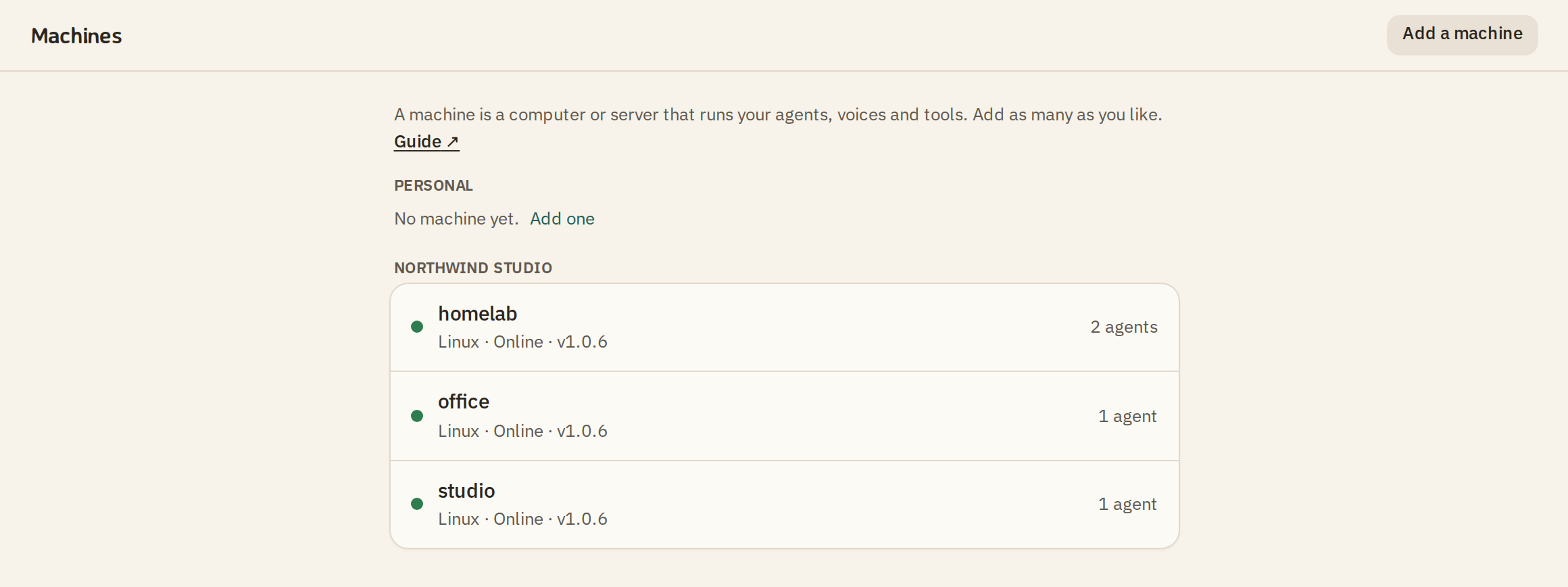
Put each agent where its work is: a laptop, a desktop, a server. Each has its machine and its folder, and they all answer in one conversation you can read.
- Agents ask each other. An agent can put a question to another agent, on another machine, and you set who may ask whom.
- One command adds a machine. macOS, Linux or Windows. A laptop works; a server is better for long tasks.
- Nothing connects in. Each machine connects out to MonoClaw over https, so there are no ports to open on your computers.
05 The stack
You decide where everything runs.
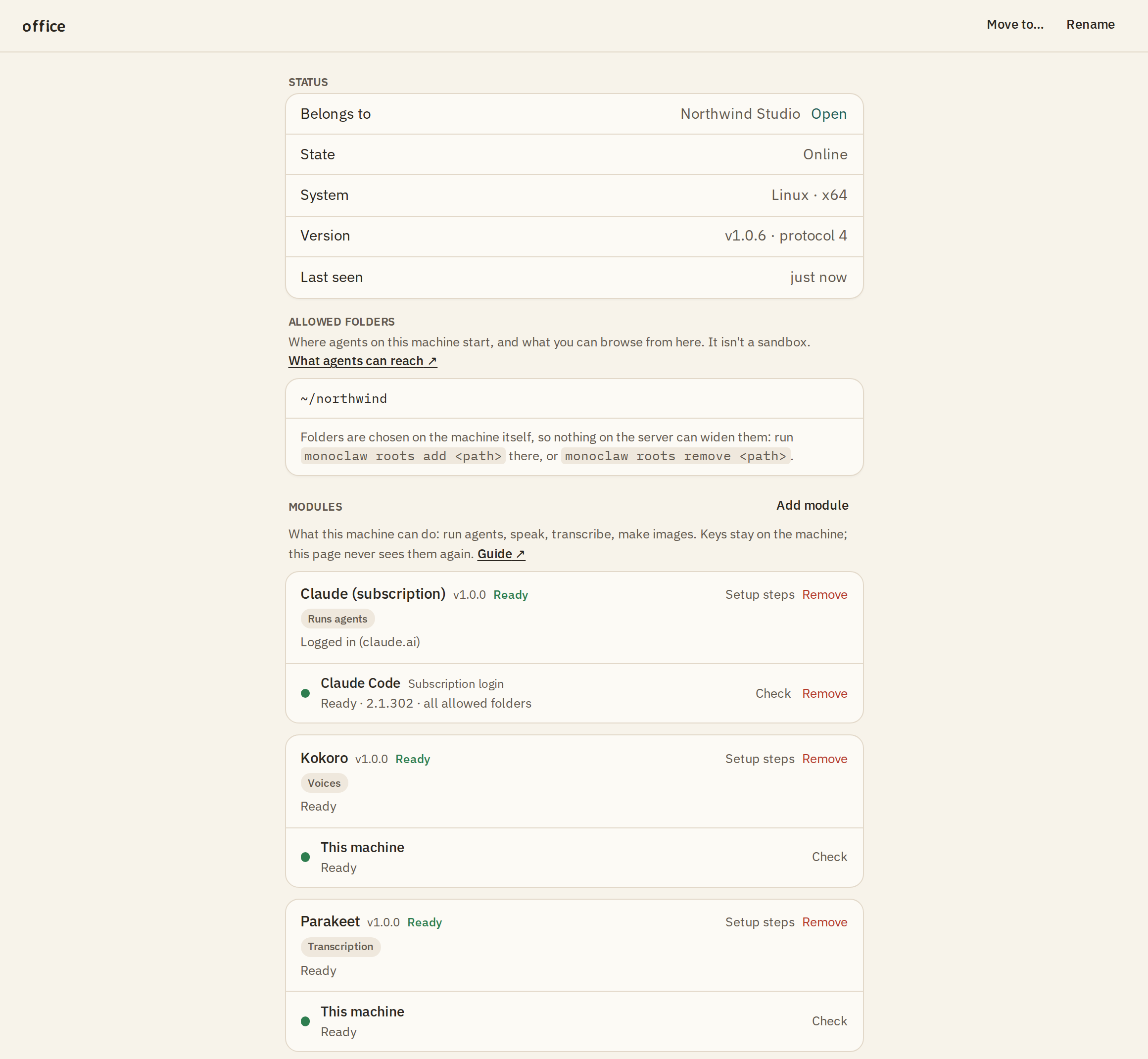
Everything your team uses is a module on a machine you choose: the agents, the voices, the transcription, the images. Run it on your own hardware with openly licensed models, or through a provider with your own key. Where your information goes is up to you.
- Your voice stays with you. Speech becomes text, and replies become speech, on your own machine, with openly licensed models. Nothing goes to a third party unless you choose one.
- Each service on the machine that suits it. Transcription on the server with the memory for it, the agents where the work is. A machine does what its modules do.
- Not tied to one provider. If a provider changes or goes away, you change the module behind an agent and the team carries on: the same people, the same agents, the same conversations. Voices and transcription can be swapped today; other engines for agents are coming.Soon
- Today
Agents
Claude Code, on your machine, with your own Claude subscription or API key.
- Today
Speaking
Kokoro, an open model on your own machine, with no account. Or ElevenLabs, with your own key.
- Today
Listening
Parakeet, an open model on your own machine, with no account. Or ElevenLabs, with your own key.
- Today
Images
fal, with your own key, for the agents you give an image tool.
06 The phone
From your phone.
Check on your agents wherever you are, and keep directing the work.
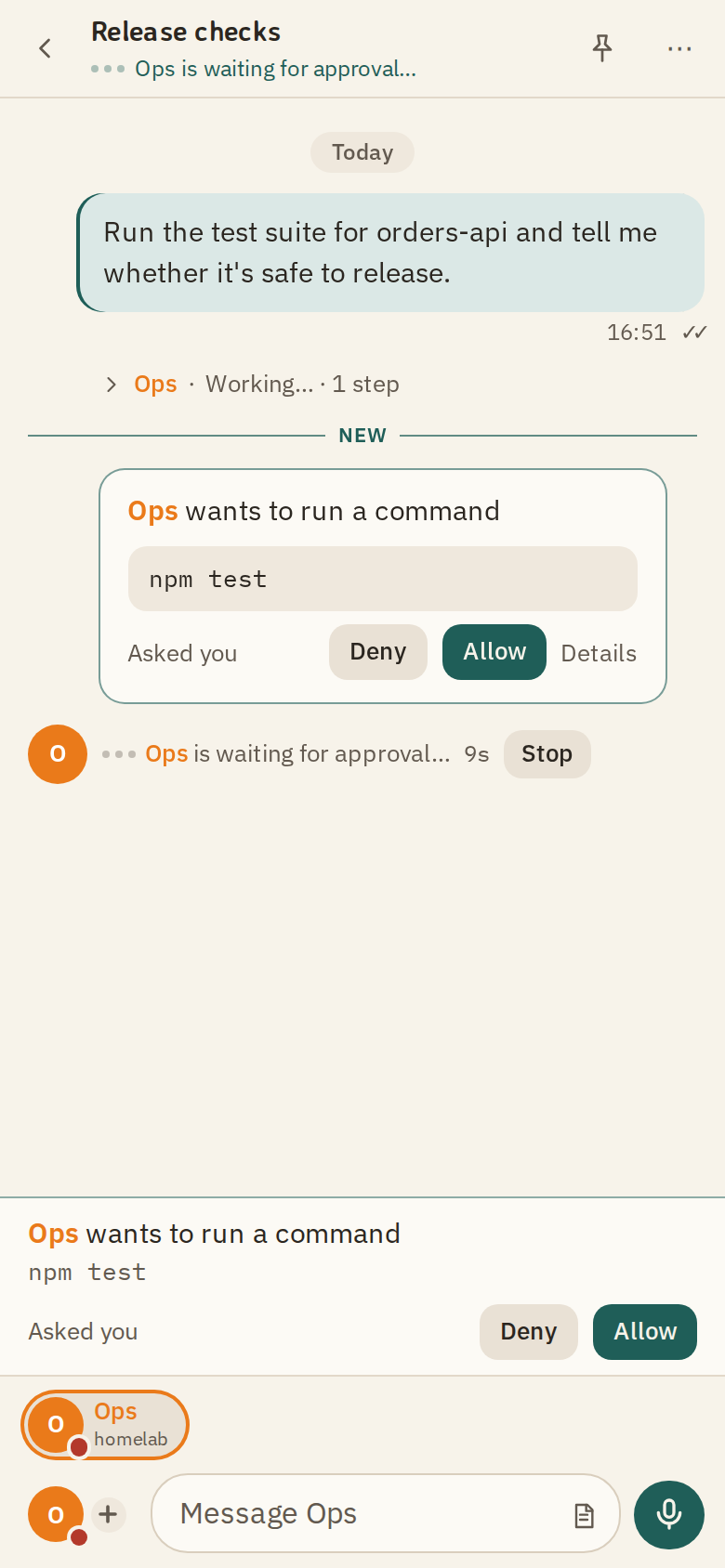
- Approve what they do. When an agent wants to do something its permissions do not cover, you see the exact command, and you allow or deny it. Only people answer.
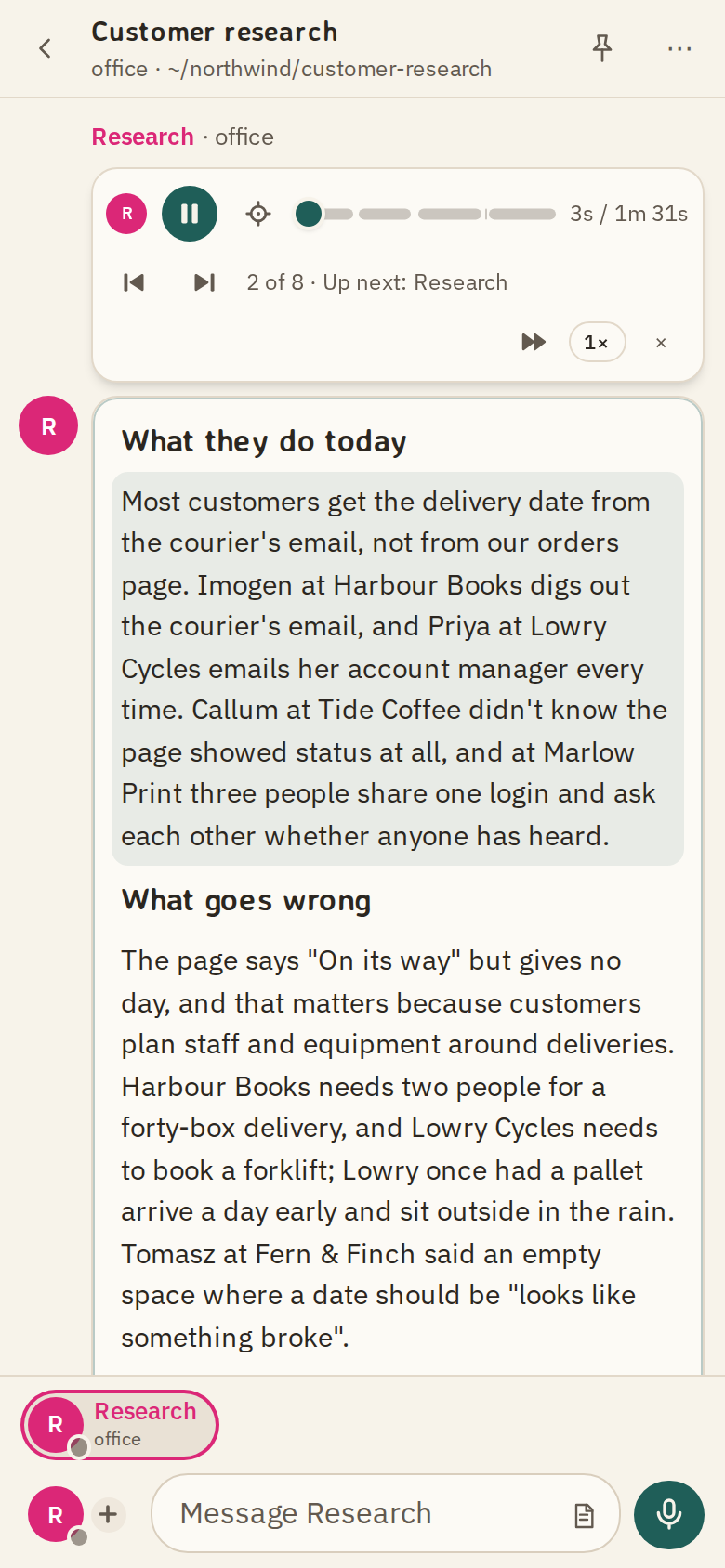
- Listen. Replies are read aloud in each agent's own voice.
- Speak. Record a message and it reaches the agent as text. Voices and transcription run on your own machines.
MonoClaw is a web app, in any browser. An iPhone app is in testing.
07 Security
Yours.
Your agents run on your own computers, in the folders you choose. Your sign-ins and your keys stay there. MonoClaw hosts no AI and holds no keys.
Your computers
Agents work on hardware you own, with your own Claude subscription or API key.
Your keys
API keys and sign-ins are kept on the machine. The service never has them.
Your rules
Each machine keeps its own rules for what agents may do. The service cannot override them.
End-to-end encryptionSoon
Conversations the service relays and cannot read.
What is true today. The service keeps the conversation, so that every device shows the same thing, and it can read what it keeps. The security guide says exactly what is stored, what an agent can reach on your computer, and what the service cannot change.
08 How it works
How it works.
Your agents run on your computers. MonoClaw sits in the middle and passes messages between them and your people.
With your people
- The web app, in any browser
- The iPhone app, in testing
- Nothing else to install
With MonoClaw
- Your account and your projects
- The conversation, its files and audio
- No AI, and none of your keys
On your machines
- Your agents and the folders they work in
- Your API keys and your Claude sign-in
- Each machine's own rules
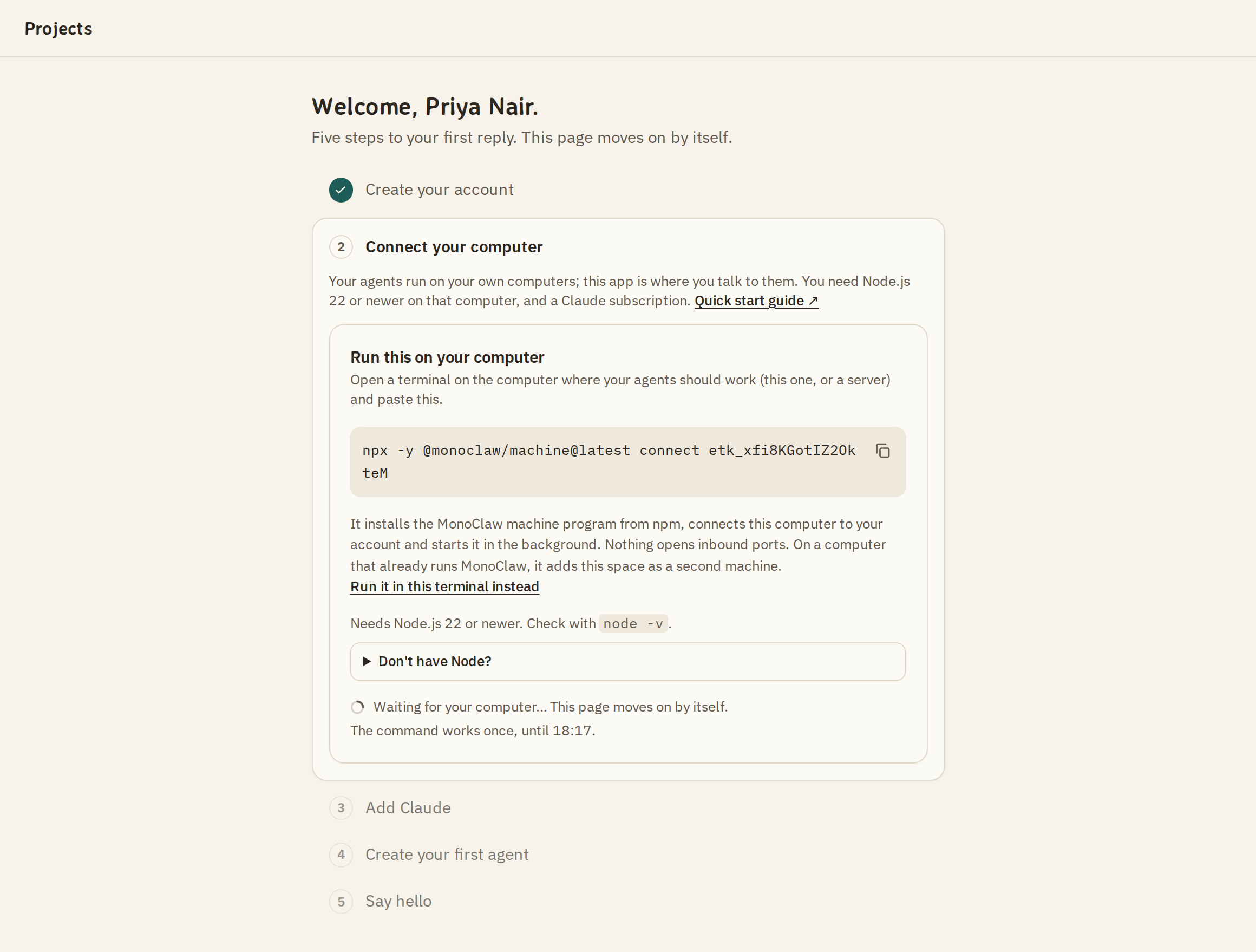
Connect a computer
Run one command on the computer your agents will work on. The token at the end comes from the app, once you have an invite.
npx -y @monoclaw/machine@latest connect <token>It installs
@monoclaw/machinefrom npm, connects the computer to your account and keeps it running in the background.Add Claude
Agents need an engine. If Claude Code is already signed in on that computer, that sign-in is used. If not, sign in there, or add an Anthropic API key.
Create an agent and say hello
Give it a name, a folder and its permissions, then send a message. The reply comes from your own computer.
You need a computer that stays on while your agents work, Node.js 22 or newer, and a Claude subscription or an Anthropic API key. The quick start has every step, and what to do when one fails.
09 Questions
Questions.
When can I use it?
MonoClaw is in private testing now. Request an invite and a person replies. Invites go out in small batches.
Which models and agents?
Today, agents run on Claude Code, with Opus, Sonnet or Haiku for each agent. More engines and open models are coming.Soon
What runs where, and what can MonoClaw see?
Your agents, their folders, your keys and your sign-ins are on your own machines, and the service never has your keys or sign-ins. MonoClaw relays messages and keeps the conversation so that every device shows it, which means the service can read it today. End-to-end encryption is coming.Soon The security guide has the detail.
Which devices?
The web app works in any browser, on a computer or a phone. An iPhone app is in testing. Agents run on computers with macOS, Linux or Windows.
What does it cost?
No price is announced. MonoClaw hosts no AI: the models your agents use are billed by your own providers, on your own accounts.
Who makes it?
Anthony Frisby, in the United Kingdom. There is more on the About page, and you can write to hello@monoclaw.ai.
10 What's new
The latest changes.
Every change to MonoClaw is dated and written down.
MonoClaw has a home page. monoclaw.ai says what MonoClaw is for and where it is going, with these docs one click away.
Stopping a message is quiet. A message you stop straight away no longer shows as “hit an error”. Machine program 1.0.6.
One computer, one enrolment under a profile.
monoclaw connect,monoclaw doctorand the other commands now work without naming the profile when it is the computer’s only one. On Linux,monoclaw service installkeeps the machine running after you log out. Machine program 1.0.5.
Who makes it
MonoClaw is made by Anthony Frisby, in the United Kingdom. The service runs on a server in the United Kingdom, and your agents run on your own computers.
Private testing. Launching soon.
Build your team.
Say in a line what you would like to use MonoClaw for. Invites go out in small batches, and a person replies.
Already invited? Sign in.